
AI Coding, From Idea to Achievement
What is Ralph
https://github.com/snarktank/ralph

As Claude Code and the underlying LLMs keep improving, Geoffrey Huntley identified a structural flaw in Claude Code, Gemini CLI and similar AI-coding tools: the context window fills up over time, LLM quality drops in the later turns of a long session, generated code gets sloppier, and the model even "forgets" earlier commitments. The fix is not a bigger context window, it is to stop accumulating context at all, by splitting a large task into small stories, handing the AI one thing at a time, wiping the slate after each story, and passing state through files.
The pattern is named after Ralph Wiggum from The Simpsons, the kid who forgets everything from the last class but can still finish whatever little task is right in front of him.
So the authors wrapped Claude Code inside a short bash loop. The core is ralph.sh.
How Ralph works
while there are still unfinished stories:
    launch a brand-new Claude Code instance
    feed CLAUDE.md to it as the prompt
    Claude Code works (reads code, writes code, runs commands)
    Claude Code exits (context cleared)
    next iteration starts from scratch
Ralph vs. plain Claude Code, the core difference
| Plain Claude Code | Ralph | |
|---|---|---|
| Context | Single session, fills up, eventually truncates | Fresh instance per iteration, context always clean |
| Memory | The context window | progress.txt + prd.json + git history |
| Task tracking | You watch it | prd.json auto-tracks what is done |
| Stop condition | You say stop | All stories flip passes: true, then auto-exits |
| Best for | Conversational, exploratory work | Multi-step, mechanical, decomposable implementation |
Ralph is not a new technology, it is a task loop wrapped around Claude Code. The value is the design idea: break a "long task" into "many short tasks", use the file system as memory, and keep the AI in its best working state at every step.
Getting started with Ralph
Option 1, Copy to your project
Copy the ralph files into your project:
# From your project root
mkdir -p scripts/ralph
cp /path/to/ralph/ralph.sh scripts/ralph/

# Copy the prompt template for your AI tool of choice:
cp /path/to/ralph/prompt.md scripts/ralph/prompt.md    # For Amp
# OR
cp /path/to/ralph/CLAUDE.md scripts/ralph/CLAUDE.md    # For Claude Code

chmod +x scripts/ralph/ralph.sh
Option 2, Install skills globally (Amp)
Copy the skills to your Amp or Claude config for use across all projects.
For AMP
cp -r skills/prd ~/.config/amp/skills/
cp -r skills/ralph ~/.config/amp/skills/
For Claude Code (manual)
cp -r skills/prd ~/.claude/skills/
cp -r skills/ralph ~/.claude/skills/
Option 3, Use as Claude Code Marketplace
Add the Ralph marketplace to Claude Code
/plugin marketplace add snarktank/ralph
Then install the skills
/plugin install ralph-skills@ralph-marketplace
Available skills after installation
/prdGenerate Product Requirements Documents/ralphConvert PRDs to prd.json format
Skills are automatically invoked when you ask Claude to
- "create a prd", "write prd for", "plan this feature"
- "convert this prd", "turn into ralph format", "create prd.json"
A full case study, Superpower + Ralph
Background. In theoretical chemistry we often need to extract energy, zero-point energy, imaginary frequencies and similar information from Gaussian .log files. Existing tools can do this in part, but here we use Ralph to build a small, end-to-end utility that automates the extraction.
Zirui Sheng's earlier post on Skills covers Superpower in detail, so I will not repeat it here. You can learn it from Advanced Applications of Agents in the Skills Era.
Workflow
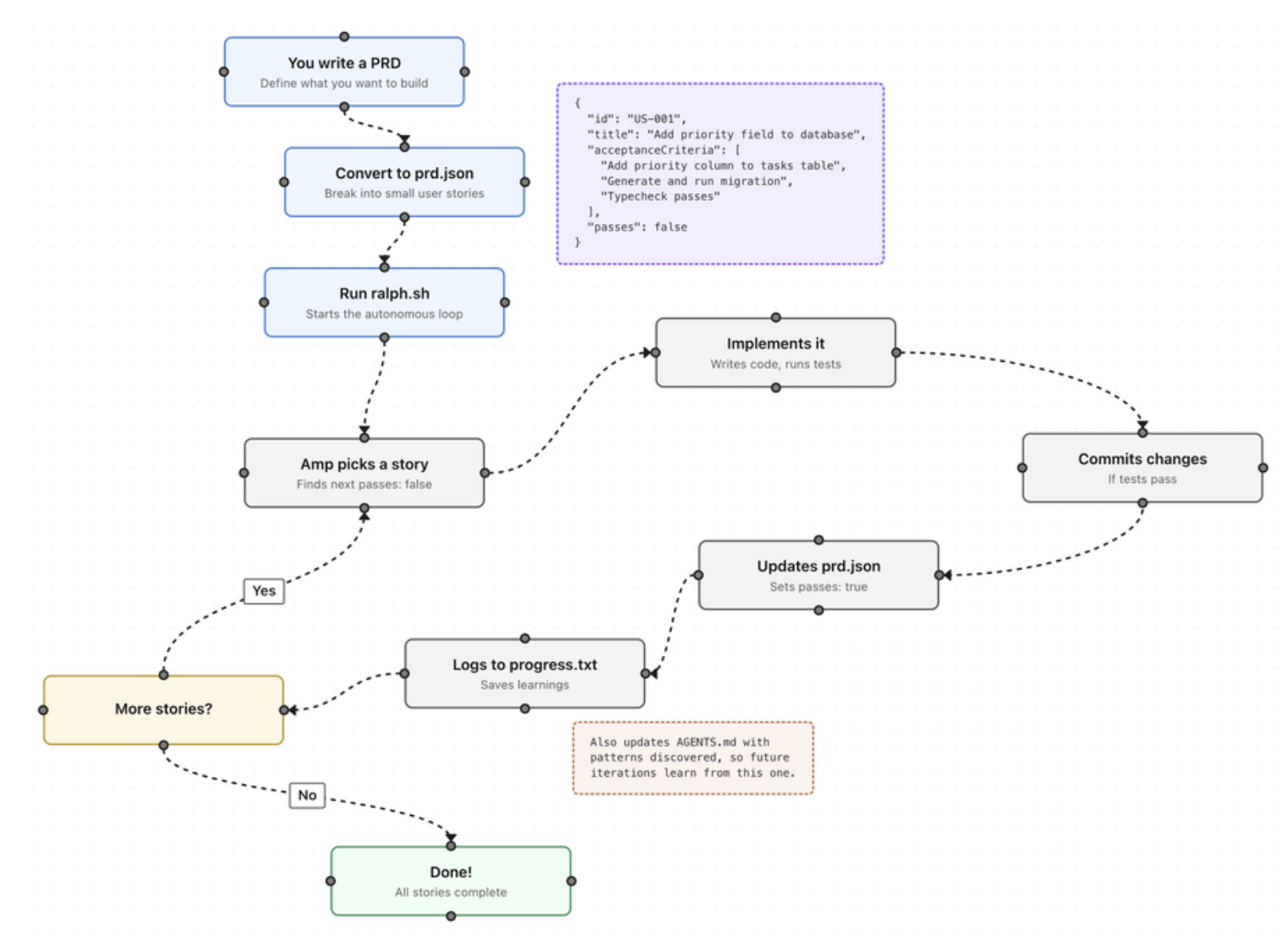
The pipeline looks like this
You (describe the need)
    |
    v
Superpowers (conversational requirement analysis)
    output, a design doc + prd.json (task list)
    |
    v
Ralph (autonomous coding loop)
    read prd.json -> call Claude Code -> implement -> verify -> mark done -> loop
    |
    v
Runnable code + progress.txt (iteration log) + cost_log.txt (cost log)
The important point is that Superpower's strong design ability, together with its idea-to-document ability, is exactly what a PRD file needs. It helps clarify requirements and turn them into documentation.
1. The Superpower pass
In this case I only stated, at the start, that I wanted a small live-coding tool.
Conversation
Q, which domain?           ->  A, theoretical chemistry
Q, what kind of tool?      ->  A, batch parsing + plotting
Q, which input format?     ->  A, Gaussian .log files
The outputs we needed were
- A design document
- Project name,
chem-report, batch parser for Gaussian output - Architecture, single-file Python CLI, three subcommands, only matplotlib as a dependency
- Three feature modules (US-001 parse, US-002 batch CSV, US-003 plot)
- Tech notes, take the SCF energy from the last
SCF Doneline, count imaginary frequencies as the number of negative entries, useNormal terminationto decide convergence - The converted prd.json (the handoff to ralph)
{
  "project": "chem-report",
  "userStories": [
    {
      "id": "US-001",
      "title": "Parse a single Gaussian log file",
      "acceptanceCriteria": [
        "Extract the final SCF energy from the .log (value on the last 'SCF Done' line)",
        "Count imaginary frequencies (number of negative values in 'Frequencies --' lines)",
        "python chem_report.py parse sample_data/mol_A.log runs cleanly"
      ],
      "priority": 1,
      "passes": false
    },
    {
      "id": "US-002", "title": "Scan a directory in batch, emit a CSV summary",
      "passes": false
    },
    {
      "id": "US-003", "title": "Plot an energy comparison bar chart",
      "passes": false
    }
  ]
}
2. Running Ralph
Inputs Ralph needs
prd.json, the structured task list (produced by Superpowers)CLAUDE.md, instructions for Claude Code (tells it how to work)sample_data/, three example Gaussian log files for validationralph.sh, the autonomous loop script
./ralph.sh --tool claude 5   # runs in your terminal
# If the job needs a lot of resources, submit ralph.sh to the cluster
After submission we got the following progress.txt summary
# Codebase Patterns
- Single file project: all logic in `chem_report.py`
- Use `python3` (not `python`) to run scripts on this system
- SCF energy: last match of r'SCF Done:.*?=\s+([-\d.]+)'
- Imaginary freq count: scan `Frequencies --` lines, count negative floats
- CSV written to current working directory (not sample_data/)
- matplotlib.use('Agg') required before importing pyplot

## 2026-04-17 - US-001, US-002, US-003
- Implemented all three user stories in a single `chem_report.py`
- US-001: parse subcommand - extracts SCF energy, ZPE, n_imaginary, converged
- US-002: batch subcommand - scans directory *.log, writes results.csv
- US-003: plot subcommand - reads results.csv, saves energy_comparison.png
  with colored bars
- Files created: `chem_report.py`, `results.csv`, `energy_comparison.png`
- Learnings:
  - python not found; use python3
  - mol_B.log has one imaginary frequency (-234.5678)
  - All three sample files show Normal termination (all converged=True)
  - WARN status triggered for mol_B due to imaginary frequency
Every story in prd.json also flipped to true, meaning all tasks were done.
{"id": "US-001", "passes": true},
{"id": "US-002", "passes": true},
{"id": "US-003", "passes": true}
Exercising the resulting tool
Parse a single file
$ python3 chem_report.py parse sample_data/mol_A.log
filename                  energy(Ha)   ZPE(Ha)   n_imag  converged
---------------------------------------------------------------------
mol_A.log                 -115.731052  0.054050       0       True

$ python3 chem_report.py parse sample_data/mol_B.log
filename                  energy(Ha)   ZPE(Ha)   n_imag  converged
---------------------------------------------------------------------
mol_B.log                  -78.587891  0.051234       1       True

$ python3 chem_report.py parse sample_data/mol_C.log
filename                  energy(Ha)   ZPE(Ha)   n_imag  converged
---------------------------------------------------------------------
mol_C.log                  -76.418502  0.020912       0       True
mol_B (ethylene) has one imaginary frequency, so it is a transition-state structure.
Batch scan -> CSV
$ python3 chem_report.py batch sample_data/
mol_A.log  OK
mol_B.log  WARN
mol_C.log  OK
Wrote 3 rows to results.csv
The generated results.csv
filename,energy_hartree,zpe_hartree,n_imaginary,converged
mol_A.log,-115.731052348,0.05405,0,True
mol_B.log,-78.587891234,0.051234,1,True
mol_C.log,-76.418502134,0.020912,0,True
Energy comparison plot
$ python3 chem_report.py plot sample_data/
Saved energy_comparison.png
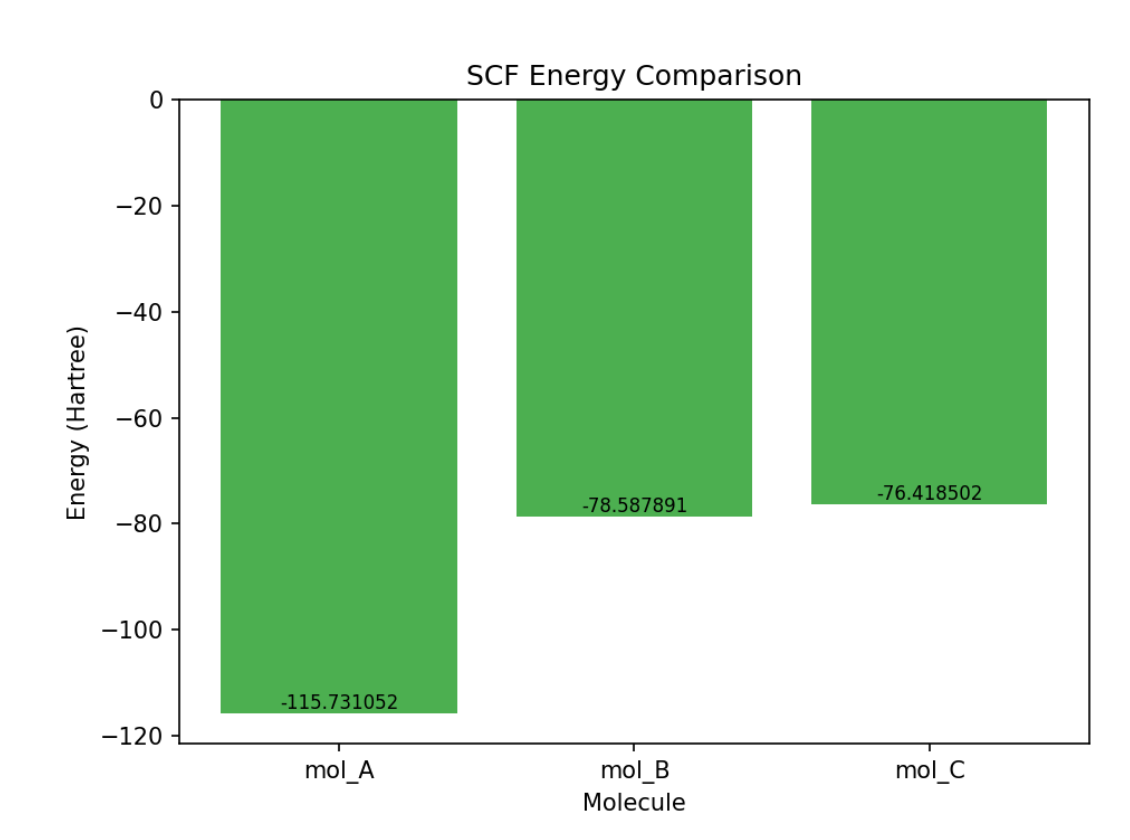
Monitoring token usage. You can ask, in your requirements, that token usage be tracked.
| Iteration | Completed | Total cost | Wall time | Claude turns |
|---|---|---|---|---|
| 1 | US-001 + US-002 + US-003 (all) | $0.3666 | 95 s | 17 |
Lessons from using Ralph
1. Ralph's backend and model configuration
Ralph can drive either Amp or Claude Code as the backend. I have only used it with Claude Code, which requires --tool claude at run time. The model itself is whatever your .bashrc or .bash_profile sets as the default for CC, as in the snippet below.
# AIHUBMIX_API_KEY is the key you get from the AIHUBMIX platform
echo 'export ANTHROPIC_BASE_URL="https://aihubmix.com"' >> ~/.bash_profile
echo 'export ANTHROPIC_AUTH_TOKEN="AIHUBMIX_API_KEY"' >> ~/.bash_profile
echo 'export ANTHROPIC_MODEL="claude-sonnet-4-5"' >> ~/.bash_profile
2. Let AI summarize AI's work, but do not trust it blindly
AI coding tools produce, in a short time, more code than you can evaluate line by line. It is unlikely you will have the attention span to review every file by hand. Opening a chat on the project folder with @folder and asking the AI to summarize the result is the path of least resistance. In practice, though, Ralph's self-report is usually very positive. For most tasks, after several iterations, nearly every user story ends up marked "pass". That could mean the code really is good and meets the requirements, or it could mean the AI could not finish the job and wrote a shell just to make your acceptance criteria happy. Your own tests will tell you which. After Ralph finishes, it is fine to have the AI summarize, but you still need real, hands-on verification.
3. Hallucinations and capability-boundary issues are inevitable during AI-coding runs
In my experience, a detailed requirements document (including prd.json) is the foundation that makes most tasks completable. Superpower plus the ralph prd skill can in fact turn your requirements into a solid input file for ralph. How to break modules down, and which parts involve theory or domain knowledge, is on you to supply to the model. Avoid letting it explore randomly. If a task is too hard or too big, it will sidestep the core problem and, to satisfy the PRD tests, it will cut corners.
4. Ralph is patchy, and we patch as we go
Do not expect one Superpower pass and one Ralph run to take a research question from idea to fully landed. Patching the generated code against your real requirements and test results is necessary. Multiple rounds of refining requirements and testing eventually land the full scope, so expect patient "debugging": sometimes you are patching the parts the last iteration did not finish, and sometimes you are patching requirements you had not yet clarified.
A few full-workflow tools worth trying
1. Deepwiki
An AI wiki for GitHub repos; a fast way to understand how any given library works.
2. AutoResearchClaw
https://github.com/aiming-lab/AutoResearchClaw
AutoResearchClaw is a fully autonomous research pipeline in the spirit of "give a research idea, get a submittable paper out".
Core capability
- Input, one sentence describing a research direction
- Output, literature review + experimental code + result analysis + LaTeX paper (NeurIPS / ICML / ICLR templates)
8 phases, 23 steps
Phase 1  Scoping        Formalize the problem, decompose research questions
Phase 2  Literature     Multi-source search (OpenAlex / Semantic Scholar / arXiv)
Phase 3  Synthesis      Knowledge graph + gap detection + hypothesis generation (multi-agent debate)
Phase 4  Design         Hardware-aware experimental design and code generation
Phase 5  Execution      Sandboxed runs, automatic error self-healing
Phase 6  Analysis       Multi-agent interpretation, decide whether to add experiments
Phase 7  Writing        Section-by-section paper drafting
Phase 8  Finalization   Quality gates + knowledge archiving + submission package
Technical highlights
- Four-layer citation verification, specifically targets LLM citation hallucinations, with every reference cross-checked across sources
- Hardware auto-adapt, auto-detects CUDA / MPS / CPU and sizes experiments to available compute
- Six intervention levels, from "fully autonomous" to "confirm every step", with three key nodes gated by human review
- Knowledge-base time decay, learns from historical runs, with older experience down-weighted
3. AI Paper Writing skill
Academic-paper-skills
- Description, a systematic framework for academic-paper planning and writing
- Highlights
- ✅ Dual-skill workflow (Strategist + Composer)
- ✅ 7-dimension reviewer simulation
- ✅ Quality checkpoints (3 validation gates)
- ✅ Support for PhilArchive, arXiv and similar preprint venues
- ✅ Includes Python validation scripts
- Best fit, philosophy, interdisciplinary and humanities / social-science papers
- Adaptability, ★★★★ (adaptable to business ethics, management philosophy, etc.)
Core workflow
Strategist (planning),
  Phase 1, platform analysis -> target journal + style guide
  Phase 2, theoretical framework -> literature + research-gap analysis
  Phase 3, outline refinement -> reviewer-style outline assessment

Composer (writing),
  Phase 1, scaffolding -> style guide + chapter plan
  Phase 2, systematic writing -> drafts with quality checks
  Phase 3, polishing -> final assessment + submission prep
claude-scientific-skills/scientific-writing