
From RAG to LLM Wiki, Let Knowledge Build Once and Last Forever
Sources:
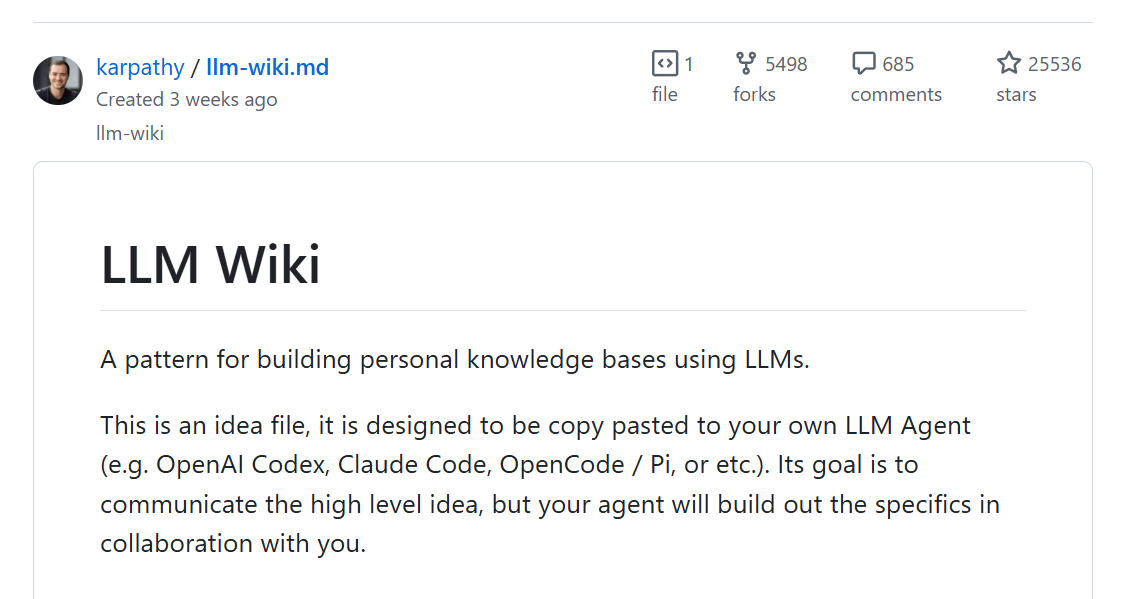
Official: Karpathy's LLM Wiki idea
LLM Wiki personal optimization: Zhihu article, Tutorial
RAG basics: CSDN Blog
Background (The Problem)
LLM capabilities come from parameterized knowledge learned during training, but this type of knowledge has several issues:
Knowledge Expiration
After model training is completed, subsequent new papers, new tools, and new project statuses are unknown to it by default.
Insufficient Domain Knowledge
General models know a lot of general knowledge, but they don't understand your own topics, experiment records, code repositories, internal documents, or previous sharing session contents.
Hallucinations and Unverifiability
It may generate answers that sound reasonable but have no sources.
So naturally, early on people thought: if the LLM itself doesn't know, can we make it "look up information first, then answer"?
This leads to RAG.
RAG: The Standard for Enterprise LLM Deployment (Method)
RAG stands for Retrieval-Augmented Generation.
Instead of letting LLMs answer from memory alone, they first find relevant materials from external knowledge bases, then stuff those materials into the prompt, allowing the model to answer based on those materials.
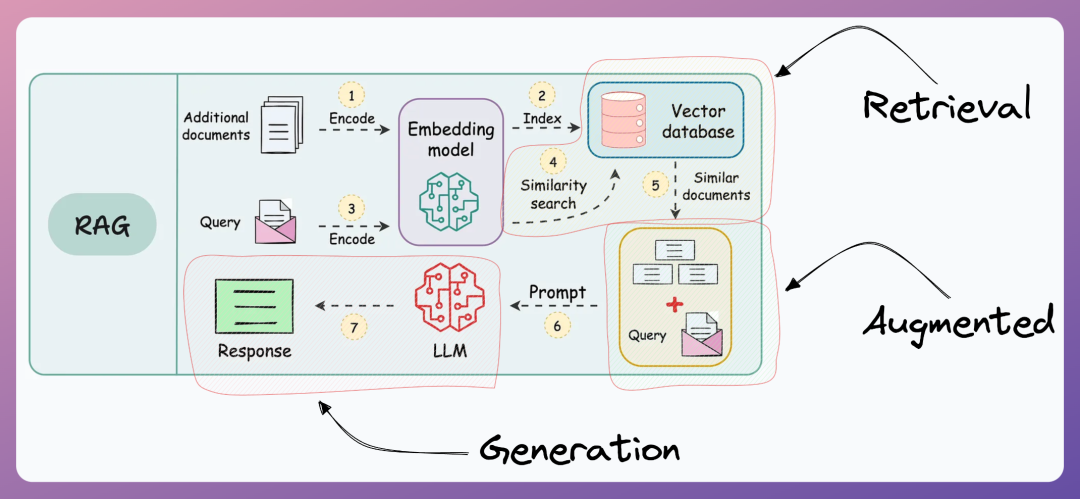
Retrieval: Actively "finding knowledge" rather than "remembering knowledge".
Traditional LLM knowledge is limited to training data. To understand new information or company internal documents, there's no way to start. RAG actively finds relevant knowledge chunks from external knowledge bases using Approximate Nearest Neighbor (ANN) search algorithms. It's like giving the LLM a "real-time search engine" that can access the latest and most specific knowledge.
Augmented: Dynamically extending context, zero-cost knowledge updates.
Retrieved knowledge doesn't go directly to users but is first "fed" to the LLM as part of the context. This solves two problems: one, you don't need to spend millions retraining the LLM for it to learn new knowledge; two, it avoids the LLM's limited context window by only passing in the most relevant knowledge chunks, improving efficiency.
Generation: Generating credible answers based on authoritative sources.
The LLM combines the user's original question with retrieved authoritative knowledge to generate the final response. The key is that it can automatically link to knowledge sources, reducing hallucination problems and making answers traceable and verifiable.
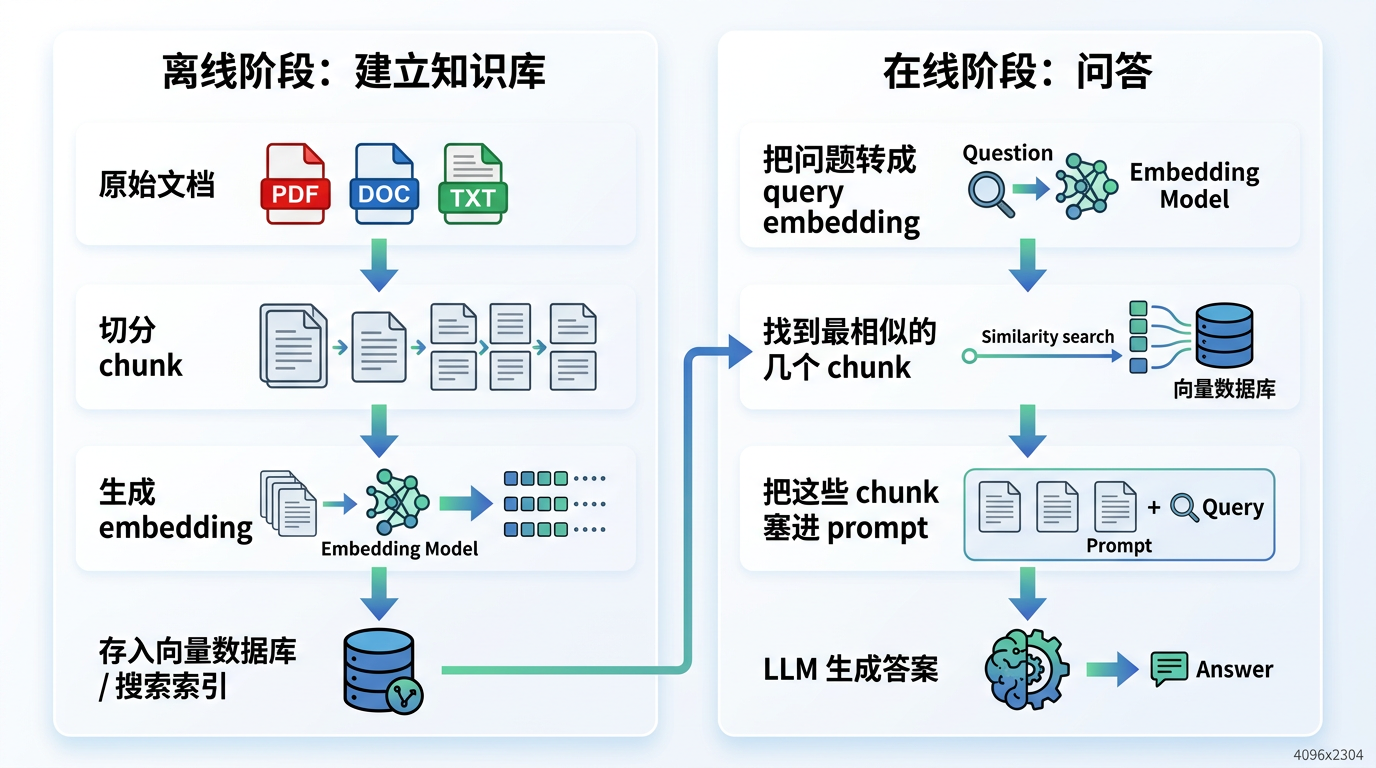
Advantages
Enables models to access private knowledge, and knowledge can be updated. For example, your experiment records, company documents, project meeting notes, and code repository documentation are not in the model's training set, and updating the RAG knowledge base is much cheaper than retraining the model.
Reduces hallucinations and facilitates citation tracing. LLM answers can be based on retrieved external materials, the model doesn't need to rely entirely on parametric memory, and it can tell you which chunks, files, or pages the answer comes from.
Disadvantages
Every query re-synthesizes from scratch
RAG retrieves chunks again, concatenates again, and synthesizes again. Next time you ask a similar question, the system starts over.
Documents aren't truly connected
RAG stores "material fragments," not "knowledge structures."
RAG knowledge bases typically have: chunk_001, chunk_002, chunk_003, chunk_004.
Not: chunk_001→ chunk_002→chunk_003 → chunk_004.
Contradictions aren't proactively exposed, no compound interest in long-term research
If A and B contradict, RAG only discovers this when both are retrieved in the same query. It doesn't proactively maintain concepts, and can't have "new materials change old conclusions."
RAG is good for asking one question and finding one piece of material. But long-term research needs: clearer concepts, richer relationships, old conclusions constantly revised, new questions settled, cross-document synthesis reusable.

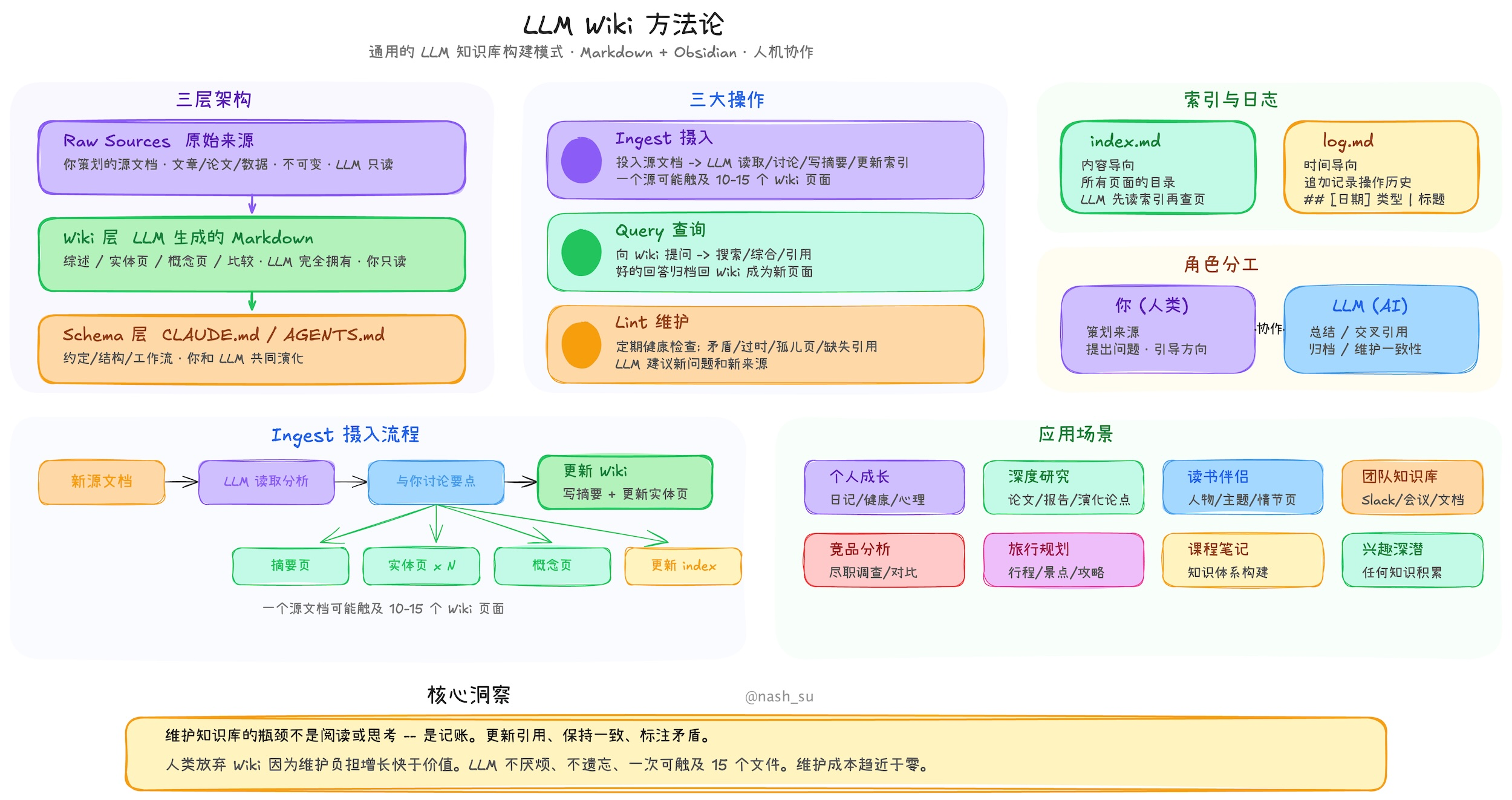
LLM Wiki: From "Retrieving Materials" to "Compiling Knowledge"
Core Ideas
- Wiki is a "persistent, compounding knowledge artifact"

The wiki is a persistent, compounding artifact.
Persistent: Lasting
LLM Wiki is not a one-time chat record. It writes valuable information as Markdown files and saves them in your file system.
Compounding: Compound Growth
Wiki becomes richer with each source and each question. LLM Wiki grows from two entry points: adding materials and asking questions.
LLM doesn't just answer you temporarily. If this question is valuable, it can settle the answer as a .md document.
In other words, in LLM Wiki, good questions themselves are a driving force for knowledge base growth.
Artifact: Knowledge Product
LLM Wiki's final output is not a one-time answer, but a knowledge system that can be repeatedly used, inspected, maintained, and migrated.
It can be read by humans, read by LLMs, version controlled, searched and refactored, extended, and shared.
- Humans explore direction, LLM maintains structure

Karpathy mentions in the original text that humans usually don't write and maintain entire wikis themselves because it's tedious. It requires summarizing new materials, updating old pages, building cross-references, discovering duplicate concepts, marking contradictions, maintaining indices, and organizing page structures.
Humans are responsible for selecting materials, asking questions, judging direction, and reviewing important conclusions.
Architecture
- Raw Sources: Original Material Layer
raw/
papers/
articles/
meeting-notes/
books/
slides/
code-notes/
Characteristics: Read-only, cannot be modified at will, serves as source of truth
Similar to the original document library in RAG, but the difference is LLM Wiki is not satisfied with just indexing these materials, it wants to compile them into the wiki.
- Wiki: Knowledge Page Layer
wiki/
concepts/
  RAG.md
  LLM-Wiki.md
  Context-Window.md
  Agent-Harness.md
comparisons/
  RAG-vs-LLM-Wiki.md
  Ralph-vs-LLM-Wiki.md
projects/
  AI-Sharing-Series.md
index.md
log.md
- Schema: Rules Layer
Schema governs how the wiki operates, including how to handle concepts when adding new materials, what the page format is, how to write citations, etc.
With schema, the LLM acts like a disciplined knowledge base maintainer.
CLAUDE.md
AGENTS.md
wiki-rules.md
templates/
Operation
- Ingest: Compile new materials into wiki
LLM Wiki's process for handling new materials: new document → read → extract key points → determine which old pages are involved → update old pages → create new pages → add cross-references → mark contradictions → update overall structure
For example, if we already have a RAG.md page, and later add Karpathy's LLM Wiki article, the LLM shouldn't just create a new karpathy-article.md, but should think:
- Does this article change our understanding of RAG?
- Does it point out RAG's shortcomings?
- Does it introduce a new concept: LLM Wiki?
- Does it need a RAG-vs-LLM-Wiki page?
So LLM Wiki's ingest is not "filing documents" but "updating knowledge structure."
- Query: Ask the organized knowledge structure, not raw docs
After a user asks a question, the LLM reads index.md, relevant concept pages, relevant comparison pages, relevant logs, and if necessary returns to raw source for verification, then generates an answer.
If this query produces valuable new synthesis, it can be written back to wiki/comparisons/ or wiki/talks/, and the question itself can become part of knowledge base growth.
- Lint: Check knowledge base health
Periodically let LLM health-check wiki, including checking page contradictions, outdated claims, orphan pages, missing cross-references, and knowledge gaps.
LLM knowledge management systems excel at proposing new research questions and finding new reference materials. This helps the wiki continuously develop and improve.
Using Obsidian
LLM Wiki heavily relies on connections between concepts. Obsidian's support for [[wikilinks]] fits this need perfectly.
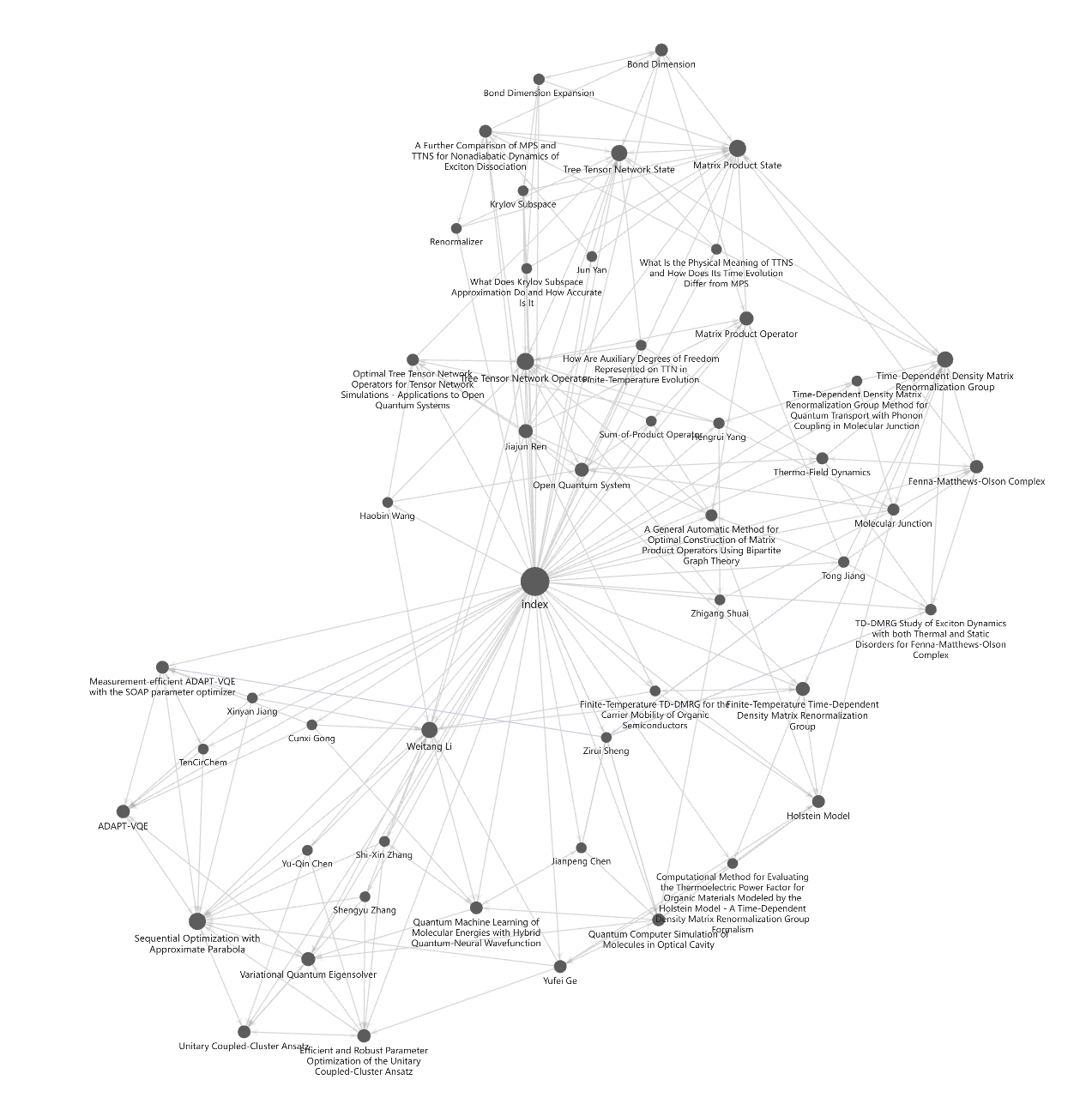
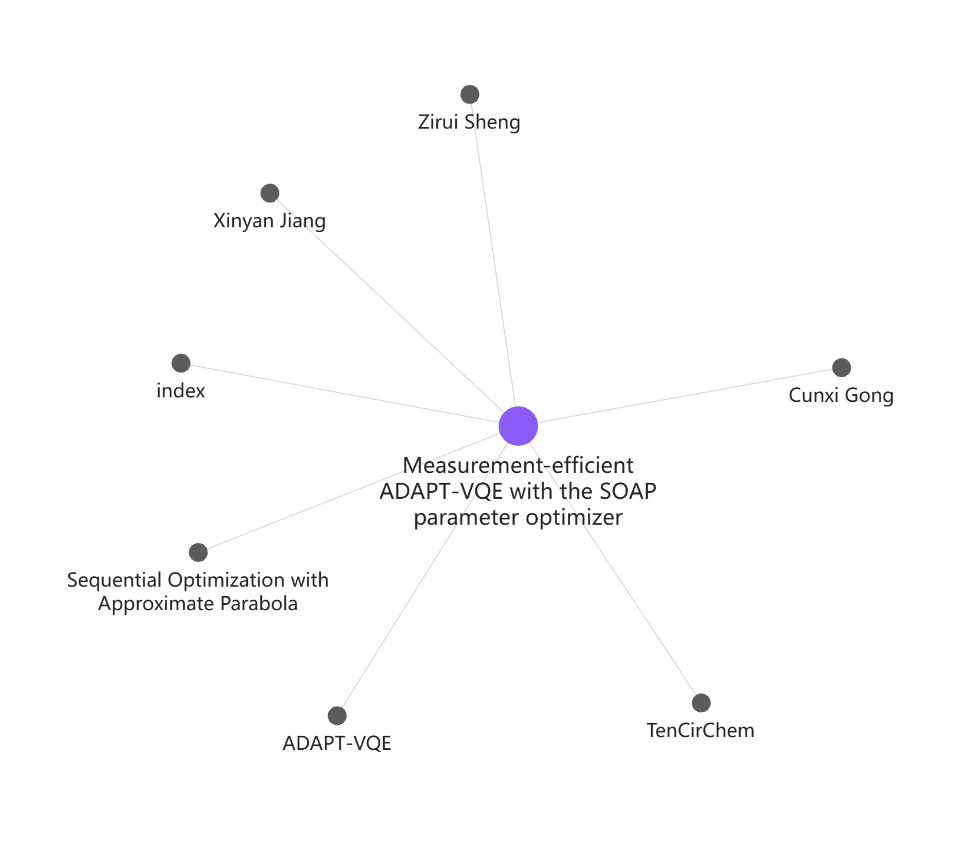
Some Disadvantages
- High maintenance cost, requires Token support
- Heavily influenced by raw files, not suitable for very small scale situations
- Cannot completely replace RAG, not suitable for very large scale situations
- High version control requirements, high need for manual intervention and inspection, especially in the initial stage
- Needs to fully let LLM control, manual operations can lead to errors
Quick Start
Initial Setup
- Install Obsidian
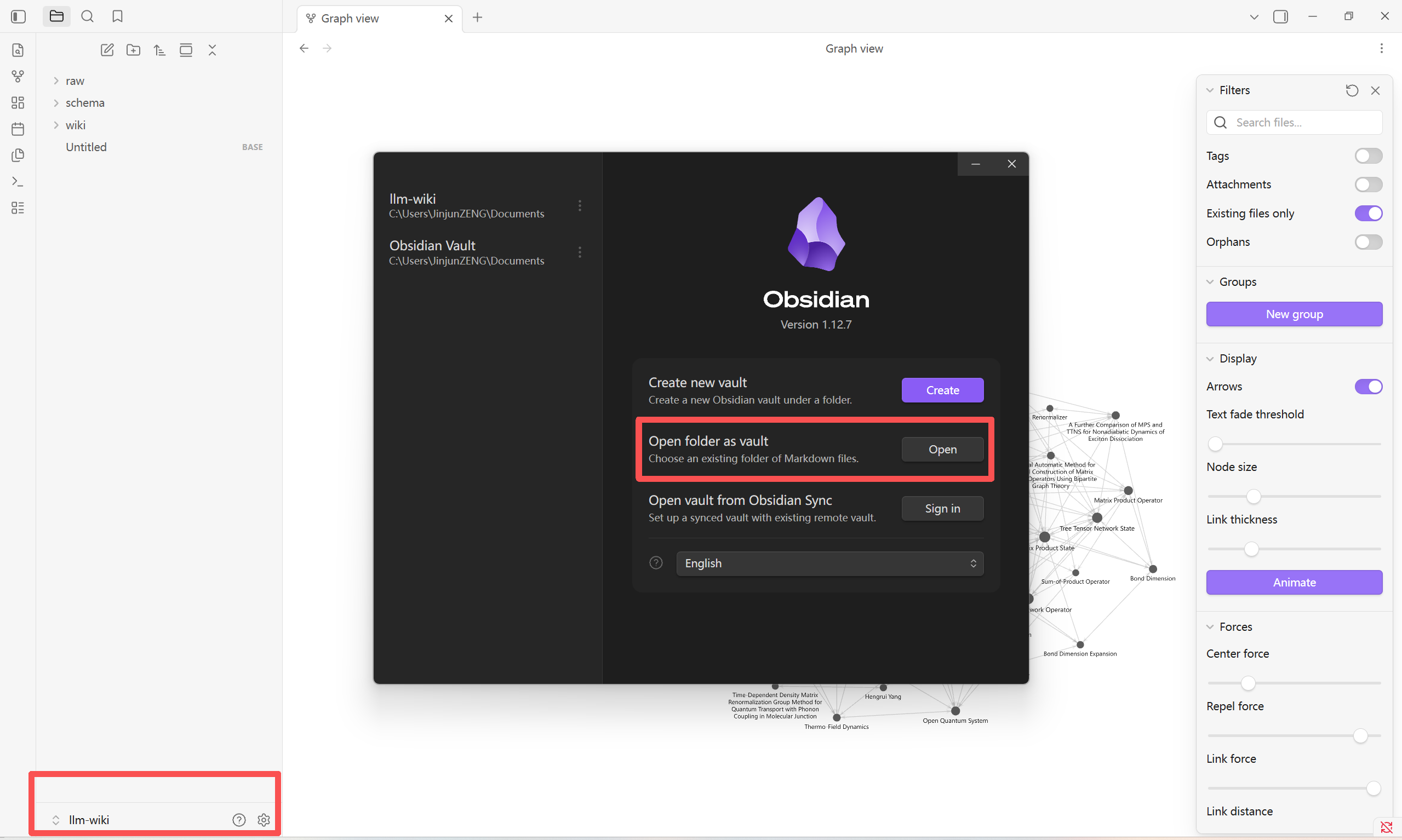
Create a folder llm-wiki, and after installation select "Open folder as vault"
- Create these folders in the Obsidian left file panel:
raw/
├── docs/       # Official docs, technical manuals, papers (PDF/MD format)
├── prs/        # Code PR records, code review comments (exported as MD)
├── incidents/  # Incident reviews, problem records (meeting minutes, review reports)
├── meetings/   # Meeting records (paste directly or export MD)
├── images/     # Screenshots, architecture diagrams, visualization materials (naming: date_topic.png)
└── others/     # Scattered materials (bookmark exports, note fragments, web clips)

wiki/
├── overview.md   # Global overview: Wiki purpose, structure description, core links
├── glossary.md   # Glossary: Core terminology, abbreviations, definitions
├── concepts/     # Concept pages: Core concepts, principles, comparative analysis (one MD per concept)
├── entities/     # Entity pages: People, tools, products detailed explanations
├── incidents/    # Incident knowledge pages: Causes, solutions, prevention measures
├── decisions/    # Decision record pages: Key decision background, basis, results
└── links.md      # Global link index: Association relationships of all pages

schema/
├── AGENTS.md         # AI agent config: Define various LLM agents and their responsibilities
├── ingest_prompt.md  # Ingest prompt: For LLM to process raw materials, extract and preliminarily process information
├── query_prompt.md   # Query prompt: For LLM to retrieve and synthesize information from wiki based on user questions
├── lint_prompt.md    # Lint prompt: For LLM to verify wiki page quality, mark contradictions, discover optimization points
└── page_template.md  # Page template: Define standard format and structure for wiki pages
- schema/AGENTS.md tells LLM agent how to maintain wiki, here's a template:
# LLM Wiki Maintenance Instructions

You are maintaining a Karpathy-style LLM Wiki.

## Directory roles

- raw/: immutable source materials. Do not edit or delete.
- wiki/: synthesized Markdown knowledge base.
- schema/: rules, templates, and maintenance instructions.

## Writing rules

1. Create Markdown pages under wiki/.
2. Use Obsidian-style links: [[Concept Name]].
3. Every important claim must cite a source filename or URL.
4. Prefer updating existing pages over creating duplicates.
5. Keep pages concise but connected.
6. Add backlinks and related pages.
7. Add "Needs verification" when uncertain.
8. Maintain wiki/index.md as the entry point.

## Page types

Create pages for:
- concepts
- people
- papers
- projects
- decisions
- open questions

## Required page sections

Each wiki page should include:

# Title

## Summary

## Key points

## Sources

## Related pages

## Open questions

## Needs verification
- Add raw materials, and suggest starting with a small amount and accumulating step by step
raw/papers/attention_is_all_you_need.pdf
raw/notes/my_llm_notes.md
raw/articles/rag_blog.md
- Open claude code/codex, let LLM agent generate Wiki:
Please maintain this Karpathy-style LLM Wiki according to schema/AGENTS.md rules.

First process all materials in raw/ and generate the first version of wiki.

Specific requirements:
1. Do not modify raw files.
2. Create entry directory in wiki/index.md.
3. Create important concept pages under wiki/concepts/.
4. If papers, people, or projects are mentioned in materials, also put them in wiki/papers/, wiki/people/, wiki/projects/.
5. Use Obsidian wikilinks, e.g., [[RAG]], [[Embedding]].
6. Each page must include Sources, noting source files.
7. Put uncertain content in Needs verification.
8. After generation, list which files you created or updated.
Ongoing Maintenance
- Ingest
Create a schema/ingest_prompt.md with ingest requirements, here's an example:
# Ingest Prompt

You are ingesting new source materials into a Karpathy-style LLM Wiki.

## Goal

Read new or unprocessed files in `raw/` and update the synthesized knowledge base in `wiki/`.

## Rules

1. Do not modify, delete, or rename files in `raw/`.
2. Create or update Markdown pages only under `wiki/`.
3. Prefer updating existing pages over creating duplicates.
4. Use Obsidian-style internal links: [[Concept Name]].
5. Every important claim must include a source reference.
6. If uncertain, add the claim to "Needs verification".
7. Update `wiki/index.md`.
8. At the end, report:
   - Created files
   - Updated files
   - Skipped files
   - Items needing human review

## Page types

Use these folders:

- `wiki/concepts/`
- `wiki/papers/`
- `wiki/people/`
- `wiki/projects/`
- `wiki/questions/`

## Required sections for each page

Each page should include:

# Title

## Summary

## Key points

## Sources

## Related pages

## Open questions

## Needs verification
When adding new materials, command LLM in codex:
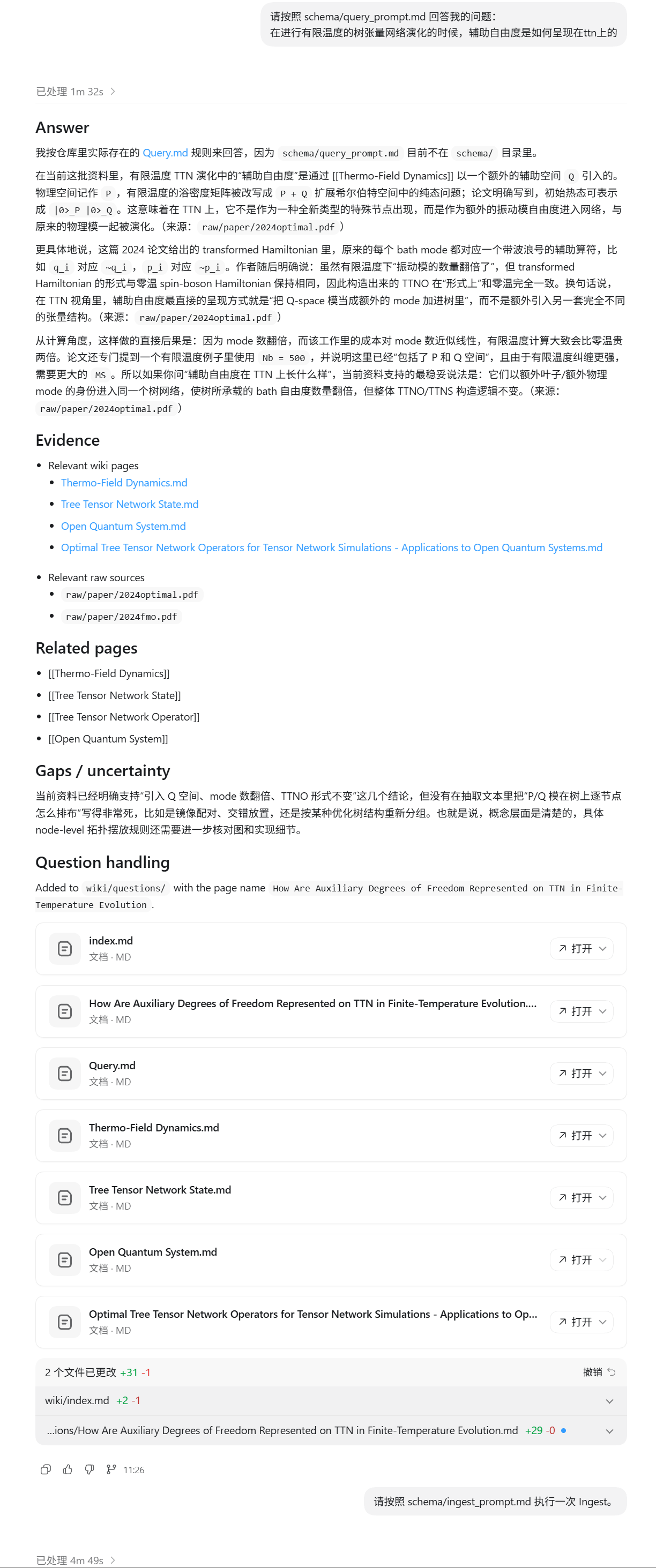
Please execute an Ingest according to schema/ingest_prompt.md.
- Query
Create schema/query_prompt.md with query requirements, here's an example:
# Query Prompt

You are answering questions using a Karpathy-style LLM Wiki.

## Source priority

1. First use `wiki/`.
2. If needed, verify against `raw/`.
3. If the answer is not supported by either `wiki/` or `raw/`, say that the wiki does not contain enough information.

## Rules

1. Do not invent unsupported facts.
2. Cite relevant wiki pages and raw source files.
3. Mention uncertainty clearly.
4. Suggest related pages using Obsidian-style links.
5. If the question reveals a missing topic, suggest a new page under `wiki/questions/` or `wiki/concepts/`.

## Answer format

Use this structure:

## Answer

Direct answer to the user's question.

## Evidence

- Relevant wiki pages
- Relevant raw sources

## Related pages

- [[Page 1]]
- [[Page 2]]

## Gaps / uncertainty

State what the wiki does not yet know.
When asking questions, command LLM in codex:
Please answer my question according to schema/query_prompt.md:
- Lint
Create schema/lint_prompt.md with lint requirements, here's an example:
# Lint Prompt

You are linting a Karpathy-style LLM Wiki.

## Goal

Inspect the structure and quality of `wiki/` without changing source materials.

## Rules

1. Do not modify `raw/`.
2. Do not delete any wiki page automatically.
3. Identify issues before fixing them.
4. If making safe fixes, only fix:
   - broken internal links
   - missing Related pages
   - missing index entries
   - obvious formatting inconsistencies
5. Do not rewrite factual content unless asked.

## Check these issues

### 1. Duplicate pages

Look for pages that cover the same topic, such as:

- RAG.md
- Retrieval Augmented Generation.md
- Retrieval-Augmented Generation.md

### 2. Missing Sources

Find pages without a `## Sources` section or with empty Sources.

### 3. Broken links

Find Obsidian links that point to missing pages.

### 4. Orphan pages

Find pages with no meaningful links to or from other pages.

### 5. Weak pages

Find pages that are too short, vague, or unsupported.

### 6. Naming consistency

Check whether page names are consistent:
- Use singular nouns for concepts.
- Use canonical paper titles for papers.
- Use full names for people.

### 7. Needs verification

Collect all claims marked as uncertain.

## Output format

## Summary

Overall health of the wiki.

## Critical issues

Issues that may mislead the user.

## Structural issues

Duplicates, broken links, orphan pages.

## Source issues

Pages missing citations or Sources.

## Suggested fixes

List safe fixes.

## Needs human review

List pages that should be checked manually.
When needing to lint, instruct LLM:
Please do a Lint on the current wiki/ according to schema/lint_prompt.md.

First round only report issues, do not modify files.
Results Showcase
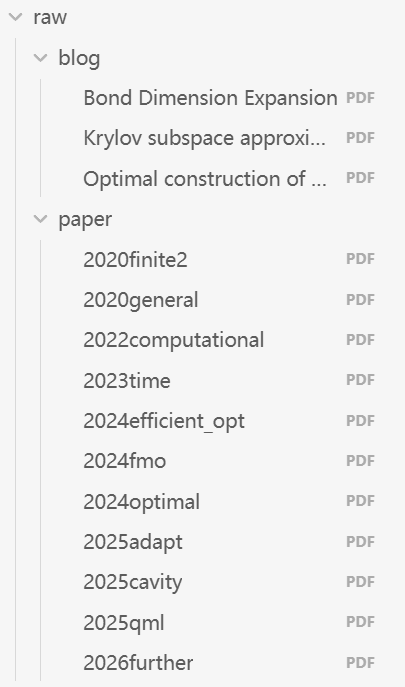
- Currently ingested raw data
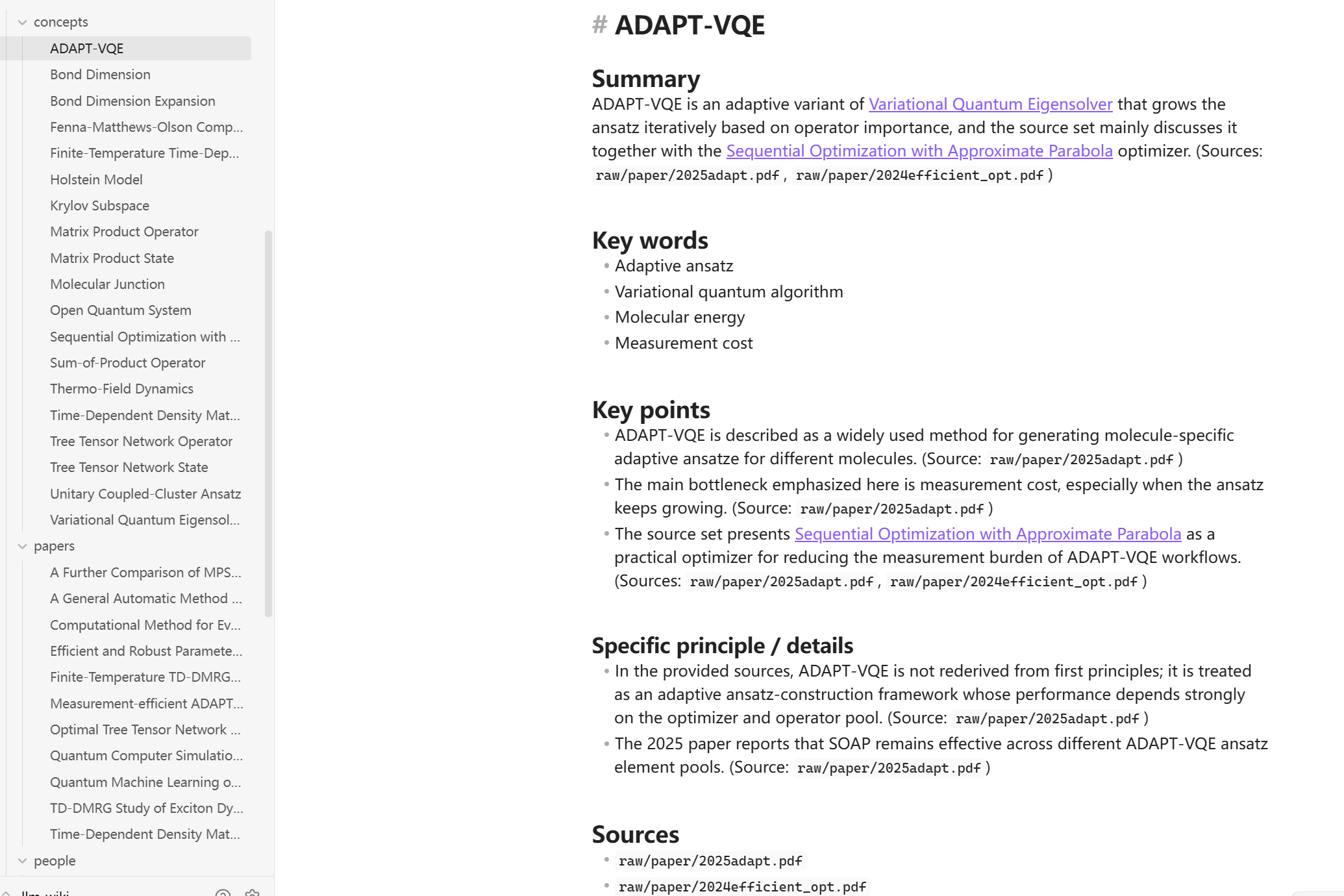
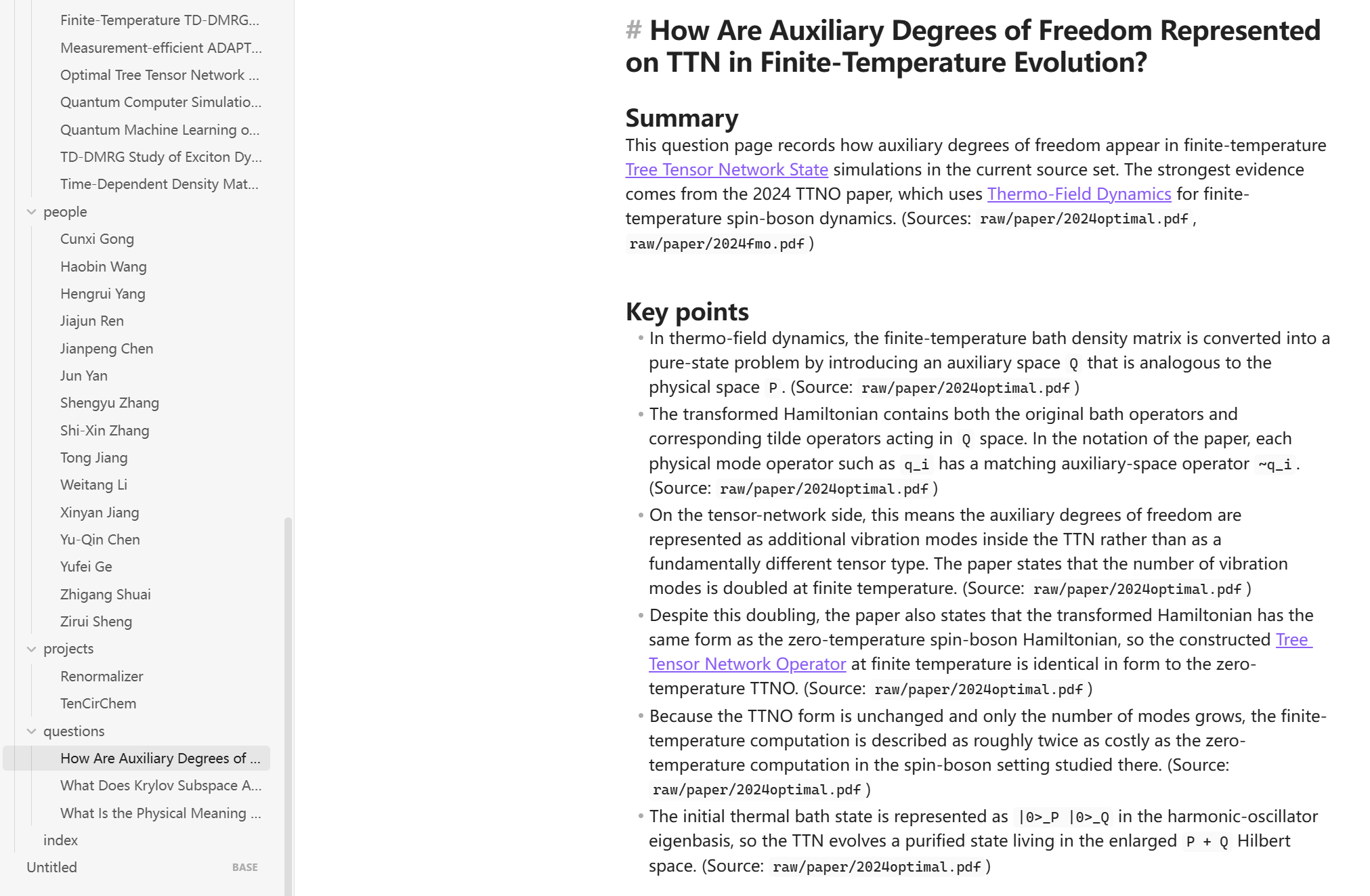
- Wiki folder contents
- Using LLM + Wiki
-
Personal Experience
-
It really is like a Wiki, able to summarize comprehensive content in very concise language
- For deep formula derivations and image understanding, it doesn't yet achieve desired results
- Limited by existing knowledge, weak ability to expand outward
- LLM-Wiki needs nurturing, and maintenance cost versus actual usage needs is a trade-off
- In actual use, I use it as a literature library for saving ideas, and its role is finding connections between literature (ideas). Cannot demand it generate a detailed and rigorous Wiki - this requires too much from both LLM and humans, not worth spending too much time on. As for details and rigor, humans (me) need to carefully read literature (ideas) to confirm.
- In today's vibe coding era, verifying ideas is cheap, validating ideas, especially human selection of ideas is expensive. From the highest point, LLM Wiki can simplify idea selection for researchers; at the lowest point, being able to form systematic literature management, building an LLM Wiki is worthwhile.
Summary
LLM Wiki is a methodology. Unlike RAG which only looks up original materials when asking questions, LLM Wiki lets large models gradually build a wiki library that can be used forever - a bunch of interconnected Markdown files.
When adding new materials, the large model doesn't just create an index to search later, it reads through first, extracts key information, and integrates it into the existing wiki. Knowledge only needs to be organized once, then continuously maintained and updated.
Human work is organizing sources, guiding analysis, asking good questions, and thinking about what all this means. LLM work covers everything else.
Suitable for:
- Vertical domain research (accumulate good papers, patents, conferences you've read, etc.)
- Single project development (accumulate project specifications, design documents, user manuals, requirement documents, etc.)
- Personal content creation (accumulate materials, your own work, work you like, etc.)
Some Online Integrated Skills
Comprehensive content: Gist link
Concise content: Tutorial link
Better visualization, more complex: Zhihu article
Larger long-term agent platform, Hermes Agent using LLM-Wiki Skills: Official docs